





Step-by-Step Guidance Inside the Systems Your Staff Already Use
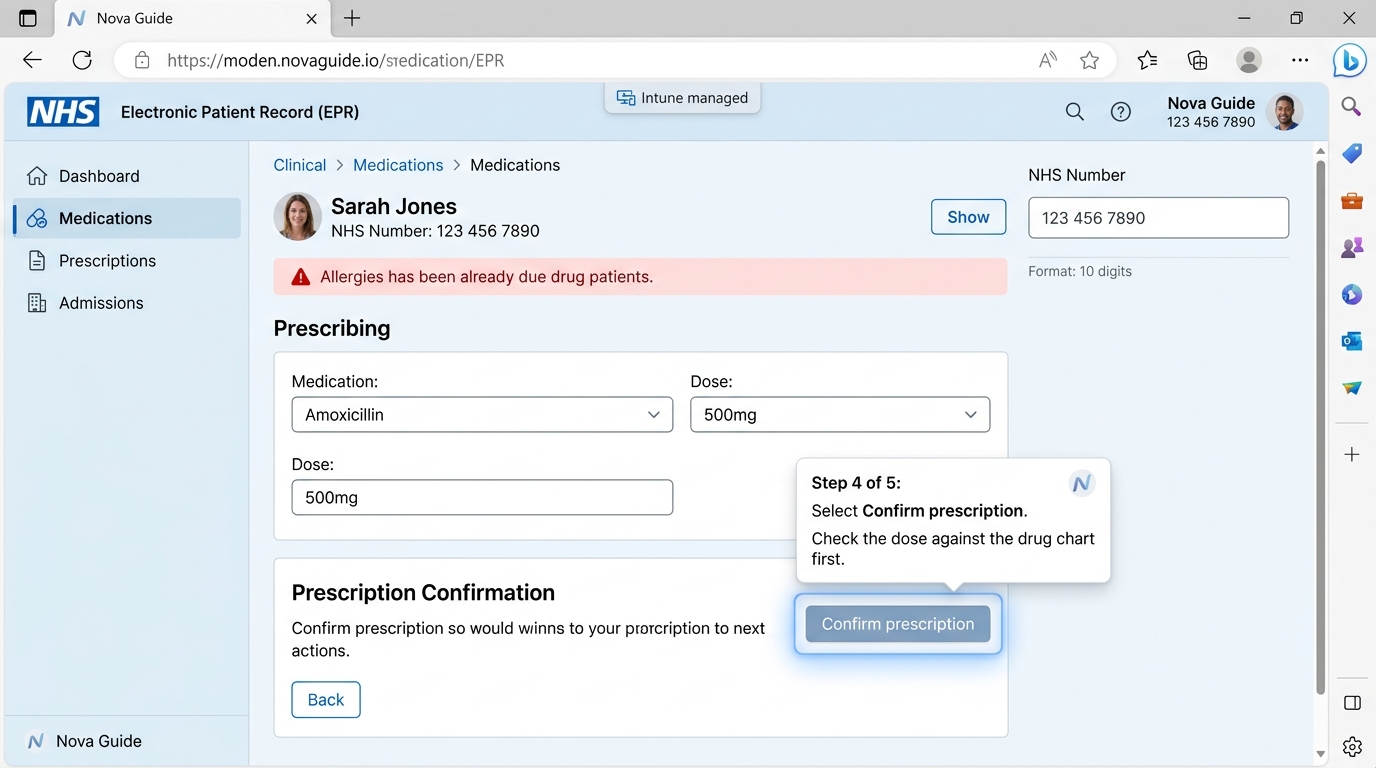
Nova Guide shows staff what to do on the screen in front of them. A guide highlights each control in turn, explains it in plain words, and moves on when the step is done. It runs over web-based EPRs and clinical applications as a browser extension, and the application itself is completely unchanged.
Engineered strictly for healthcare with closed shadow roots, footprint under 50 kB, and full DCB0129 clinical safety governance. Deployed centrally through Microsoft Intune.
Challenges Solved
Bridging the Gap Between Training and Real Clinical Shifts
Training Fades
Classroom training often happens weeks before go-live, and much of it is forgotten by the first shift. Nova Guide provides immediate at-the-elbow reassurance.
Staff Move
Rotating junior doctors, bank and agency staff, and new starters frequently miss scheduled classroom sessions entirely. Guidance is live on their screen.
Systems Change
Each software upgrade changes a workflow, and retraining a whole hospital workforce is slow and costly. Update the guide once; every user gets the new path.
Help is Stretched
Service desks and floorwalkers answer the same how-do-I questions repeatedly. Nova Guide eliminates repetitive questions at the source.
What Staff See on Screen
-
Interactive Guides: Walkthroughs that highlight each control in turn, ask branching questions, and can finish by continuing in another hospital application.
-
Tooltips & Beacons: Notes pinned to a control, and pulse markers that draw the eye to something new or updated on the screen.
-
Field Hints: A line of advice under a field when an NHS number fails its Modulus 11 check digit or a date is invalid. The field stays fully editable and submittable.
-
Announcements: Short notices about changed clinical processes shown once per person/session with a direct button to launch the guide.
-
The Launcher: A subtle button on each screen listing guidance for that screen, with recent announcements on an Updates tab. Never steals keyboard focus.
How Guidance is Made
Record in Nova Guide Studio
The author carries out the task with Nova Guide Studio open. Each click becomes a step, with wording drafted from the control's accessible name.
Clinical Review & Approval
A named reviewer approves the exact version. High-risk guidance requires an approver other than the author and registered clinician sign-off.
Targeted Publishing
Each guide goes live signed with ECDSA P-256, for the screens, date ranges, wards, and staff groups it was written for.
Automated Maintenance
PULSE analytics shows which guidance is used and completed. When an EPR changes and a step stops finding its control, Nova Guide automatically raises an alert.
Clinical Safety & Governance
Built for Systems Where a Wrong Click Matters
Points Only Where Certain
Identifies controls from weighted attributes, accessible names, text, and structure. If ambiguous, the target is reported lost and waits safely rather than guessing.
Approval Tied to Exact Content
Approvals bind a named person and clinical registration to the SHA-256 hash of the exact content, recomputed at every publish. Edits require re-approval.
Withdrawal in ~1 Minute
Workstations check every 30s. Withdrawn content stops within about 60 seconds, even mid-guide. Fails closed if offline for 15 minutes.
No Patient Data in Analytics
Events record guide, step, and screen path only. Zero page text, typed values, or URL query parameters. Staff IDs pseudonymised with HMAC-SHA256.
Ready for Shared Workstations
Ward COW terminals keep no local record of progress, ensuring subsequent clinicians never inherit half-finished guides. Workstations and users counted separately.
Accessible by Design
Never traps keyboard focus. Built to WCAG 2.2 AA under Public Sector Bodies Accessibility Regulations 2018, tested with axe-core, NVDA, and JAWS.
Transparent Telemetry
PULSE: Five Measures You Can Check by Hand
Every metric prints its exact formula and fraction. Counts of fewer than five staff members are withheld for privacy.
Proficiency
Guides completed ÷ Guides started
Uptake
Live guides used ≥1 ÷ Live guides
Loyalty
People returned ÷ People active in previous period
Satisfaction
Answers of "Helpful" ÷ All answers
Engagement
People who used >1 guide ÷ People who used any
Fits Directly into Your NHS Estate
- Intune Managed: Runs in Microsoft Edge and Google Chrome, installed and configured centrally through Microsoft Intune policy packs.
- Zero Integration: Operates in a closed shadow root. Needs no integration with the EPR and no change to hospital application code.
- UK Hosting & SSO: Runs in Microsoft Azure UK South with single sign-on via your NHS trust's Microsoft Entra ID.
- Clinical Safety Case: Developed under DCB0129 with a named registered Clinical Safety Officer. Evidence pack supplied for your DCB0160 assessment.
Accreditations & Standards
For demonstrations, technical policy packs, or clinical safety assurance documents, contact our digital transformation team.
See Nova Guide on Your Clinical Systems
Book a demonstration to see how step-by-step guidance transforms staff confidence, reduces service desk strain, and secures clinical safety.